I’ve spent a ridiculous amount of time this year experimenting with AI. I’ve built apps, worked extensively with coding agents, automated a bunch of different tasks and workflows, tested pretty much every model available, and gone down more rabbit holes than I’d care to admit.
Some of it was very productive. Some of it was a complete waste of time. But, regardless, I learned a lot.
Earlier this week I wrote about what AI-native means to me: being comfortable, capable, and confident using AI. That’s my definition, at least.
Lately I’ve had several people ask me some version of the same thing: “So what should I do? How do you recommend I start?”
Well, there are two months left in the year, and a lot of us will have some extra time on our hands before the new year starts. In my mind, that’s the perfect opportunity to experiment and go deeper with AI.
The holidays help too. Between Thanksgiving, Christmas and everything in between, there’s a lot to plan: meals, gifts, travel, time with family, New Year’s resolutions, etc. None of it has to be perfect, which makes it a good place to practice.
So this article is what I would do with those two months. Not what you should do. Not what the right thing to do is, or what the wrong thing to do is.
Here’s how I’d lay it out. Each stage builds on the one before it.
This weekend: I’d set up my environment
1. I’d set up one place to do all of my learning
Before any of the habits below, I’d set up my environment. I’d want one place where everything I learn over the next couple of months builds on itself, instead of getting scattered across a hundred different chat windows.
I’d commit to where I’d work. For me, it’d be Claude Code via the CLI. Absolutely nothing wrong with the desktop app, but I prefer the terminal. That’s just me. But I’d use Claude Code/Codex over chat. Chat is great for asking questions, but Claude Code/Codex can actually create and change files on my computer, and that’s what I want here. Then I’d tell it something like this:
I want to become AI-native by January 1. I really want to get deep into AI over the next two months. Set up a folder on my computer called AI-Native. Put a CLAUDE.md and a README in it, and whatever else you think I need to get started. I’m going to do my AI learning/experimentation inside this folder, and I want you to help me build out the folders and files as we go, because I’m not technical. Interview me first so you know who I am and what I’m trying to do (if you don’t know this already).
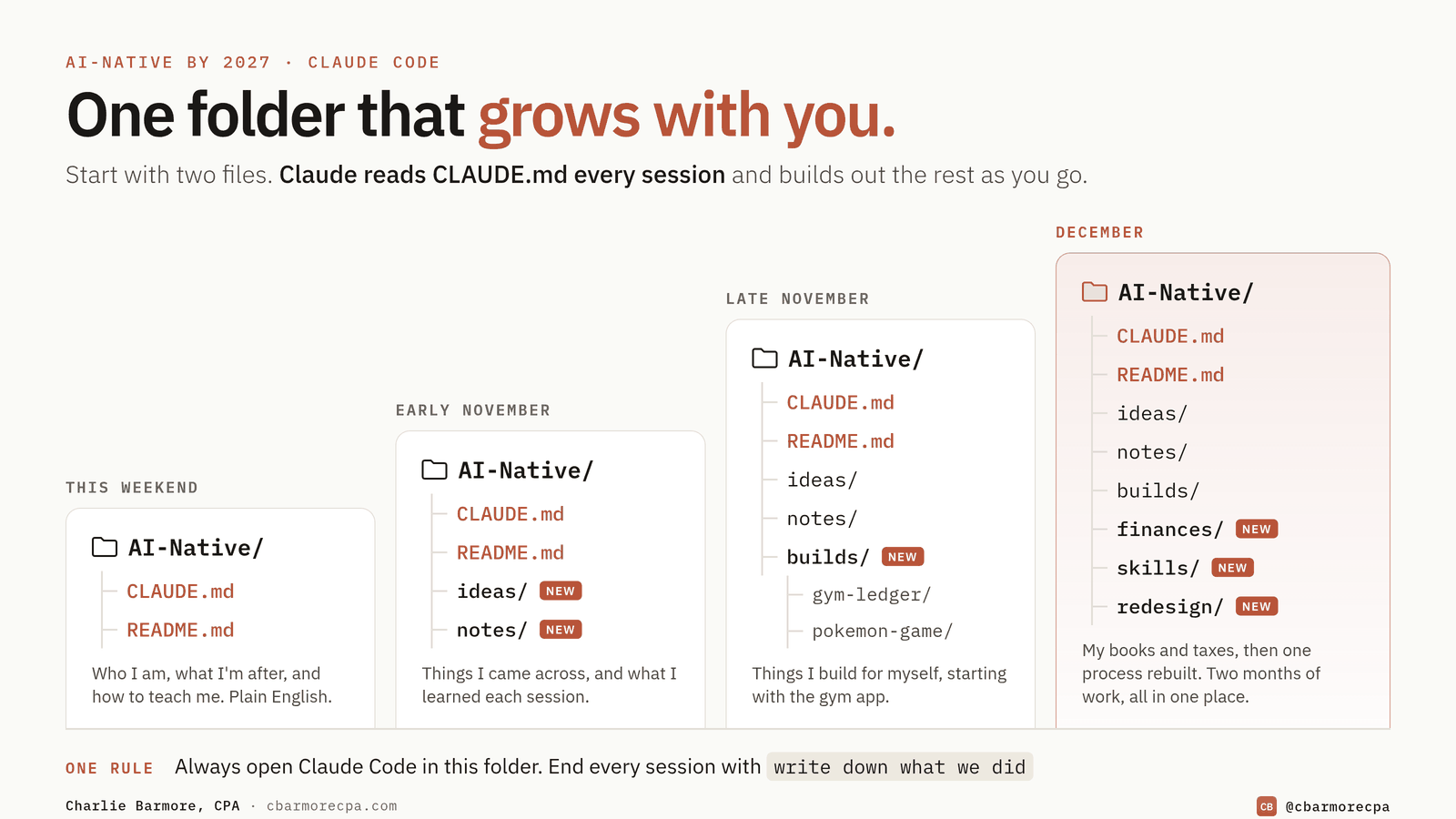
CLAUDE.md is the file Claude will read every time I start a session in that folder. It’s where I’d tell it who I am, what I’m trying to do, and how I want to be taught: plain English, no technical jargon, and tell me when there’s a better way to do what I’m asking.
The README is the map of what’s in the folder.
Both of these will evolve over time (Claude can and will update them).
Then I’d make sure that whenever I sat down to learn or try something, I’d open Claude Code/Codex in that folder. And at the end of each session, I’d have it write down what we did and what I learned, and make any updates necessary.
I wouldn’t try to design the whole thing up front, because I don’t know what I’ll need a month from now. It’ll start with one folder and two files and grow as I do: a place for ideas, notes on what I learned, and the things I build. By January it’s a record of the whole journey, and an environment that knows me well enough to actually be useful.
Halloween presents a solid opportunity and would be my first test. I’d ask it to research the best neighborhoods to take my kids trick-or-treating, and I wouldn’t stop at a recommendation. I’d give it an assignment: look at the neighborhoods nearby, compare them on walkability, distance from the house, and whatever community events are happening, and tell me the tradeoffs.
Maybe I use what it recommends, maybe I don’t. The point is to get an understanding of how it accomplishes the task and how well it does. I’d be ambitious and get it to create an interactive 3D map, visuals, etc.
The first half of November: I’d make AI the default
2. I’d remove the friction
I’d reduce as much friction as possible between me and using AI. I’d install the app on my phone and remote-control into the session, so I can work from my phone when I’m not at my computer, and I’d keep it launched on my primary computer screen. I’m a strong believer that habits follow convenience. If there is too much friction, I’ll use it less. If it’s one click away, I’ll use it more.
But I’d also address the bigger friction, which is simply decades of not using AI.
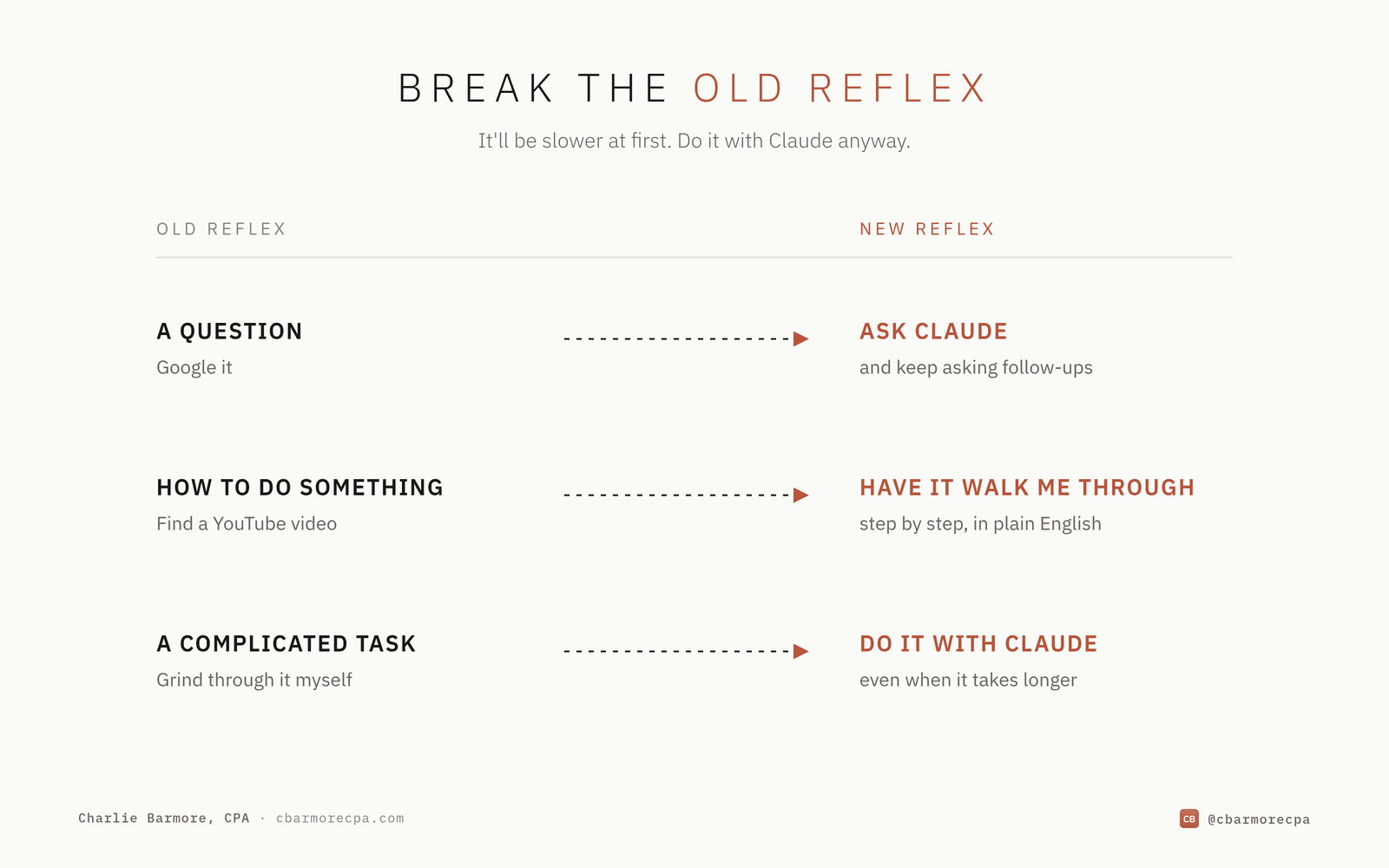
- When I have a question, my instinct is to Google it.
- When I need to figure out how to do something, I go to YouTube.
- When I have a complicated task, I sit down and start grinding through it myself.
I’d interrupt these habits on purpose and do them with Claude.
And early on, I’d accept that it’s slower. There will be plenty of times when doing something myself, or the old way, would be faster than doing it with Claude or figuring out how to do it with Claude. But I’d do it anyway, because what I’m really after is the skill and the mindset.
3. I’d mix it into the things I already like doing
I’d commit to using it every day in some capacity, and I wouldn’t build some elaborate learning plan first. The easiest way I know to make it stick is to bring AI into things I already care about: my hobbies, my interests, the stuff I’d be doing anyway. If it feels like a chore, I’m less likely to stick with it.
I also wouldn’t try to force it into my work, at least not yet. Personal things have less pressure to get it right. This is basically how I started:
- I like golf, so I automated the golf pool I manage for my friends and transitioned from doing it manually in Excel to a mini-app that I shared with the group with real-time scoring and updates.
- I run, so I built a simple app to track and analyze my runs and have it suggest different running routes close to where I live depending on how long of a run I wanted to do.
- I work out at home, so I had it figure out a better way to lay out my home gym based on my equipment and square footage to maximize my space.
- I wanted to build a porch swing, so I had it create a 3D visual, material list, and step-by-step guide.
The question I’d keep asking myself isn’t could I use AI for this? It’s how can I use AI for this?
The key is to have fun with it. Generate images, make videos, build little apps, and reimagine what’s possible. I think people underestimate how much you learn when you actually enjoy what you’re doing.
4. I’d talk to it
I’d use voice mode, because I prefer talking to AI over typing. I’d use it in the car when I’m driving (hands free, safety first) and whenever I go on walks or runs (keeps me in Zone 2). Instead of turning on music, I’d open voice mode and start chatting. I’d:
- Talk through a problem I’m working on
- Brainstorm some idea I have
- Ask about something I’ve been curious about (likely AI)
Having an actual conversation with AI is a very different experience from typing into a chat box. It helps me think things through, and I end up somewhere I might not have gotten on my own. I tend to be more raw when speaking to it. I think it’s because when I’m typing, I can see what I’m writing and I’m more aware, so I might hold things back or change something. Plus I think and talk much faster than I type. This is just me, though. You do you.
But I wouldn’t try to make every conversation produce something (again, it shouldn’t feel like a chore). I’d just talk and brain-dump. The point is to get comfortable interacting with it the way I would with another person.
5. I’d largely block out the noise
There’s way too much happening in AI right now. Every day there’s a new model, a new tool, a new benchmark, or someone declaring that everything has changed (or that we’re all doomed). Keeping up with all of it is a full-time job, and it makes me feel behind. Also, I think it’s easy to mistake consuming AI content for building AI skills.
But I wouldn’t disconnect completely. I’d subscribe to a couple of good AI podcasts and/or YouTube channels and listen passively. That’s enough to know what’s going on and catch the occasional thing worth trying (or asking Claude about).
If something did catch my attention, I’d give it to Claude. I’d set up an “Ideas” folder within my AI-Native folder and dump everything there. I’d set the instructions for that folder to be something like:
I’m going to dump ideas in here and things I come across pertaining to AI. I primarily want you to capture these for me to expand on later, so when I dump something in here, give me the tl;dr on it as a non-technical person, and then we can go deeper on it if and when I say so.
Then the next time I’m on a drive or walk, I’d talk it through with Claude if I wanted to go deeper on one.
6. I’d ask Claude how to get better at using Claude
- If I didn’t understand what an “agent” was, I’d ask Claude and have it explain it to me in a way that was easy to grasp.
- If I wanted to connect it to my files or my email, I’d have it walk me through it.
- If I saw someone doing something cool, I’d describe it (or screenshot it) and ask what it is and how they did it.
I’ve had AI explain technical concepts to me more times than I can count. It’s the first software in history where you can just ask it how to use it.
7. I’d focus on how it actually works
This is probably the most important part of this whole article. I’d be hyper-focused on how it works. I’d question it anytime it did something good, and also anytime it did something bad.
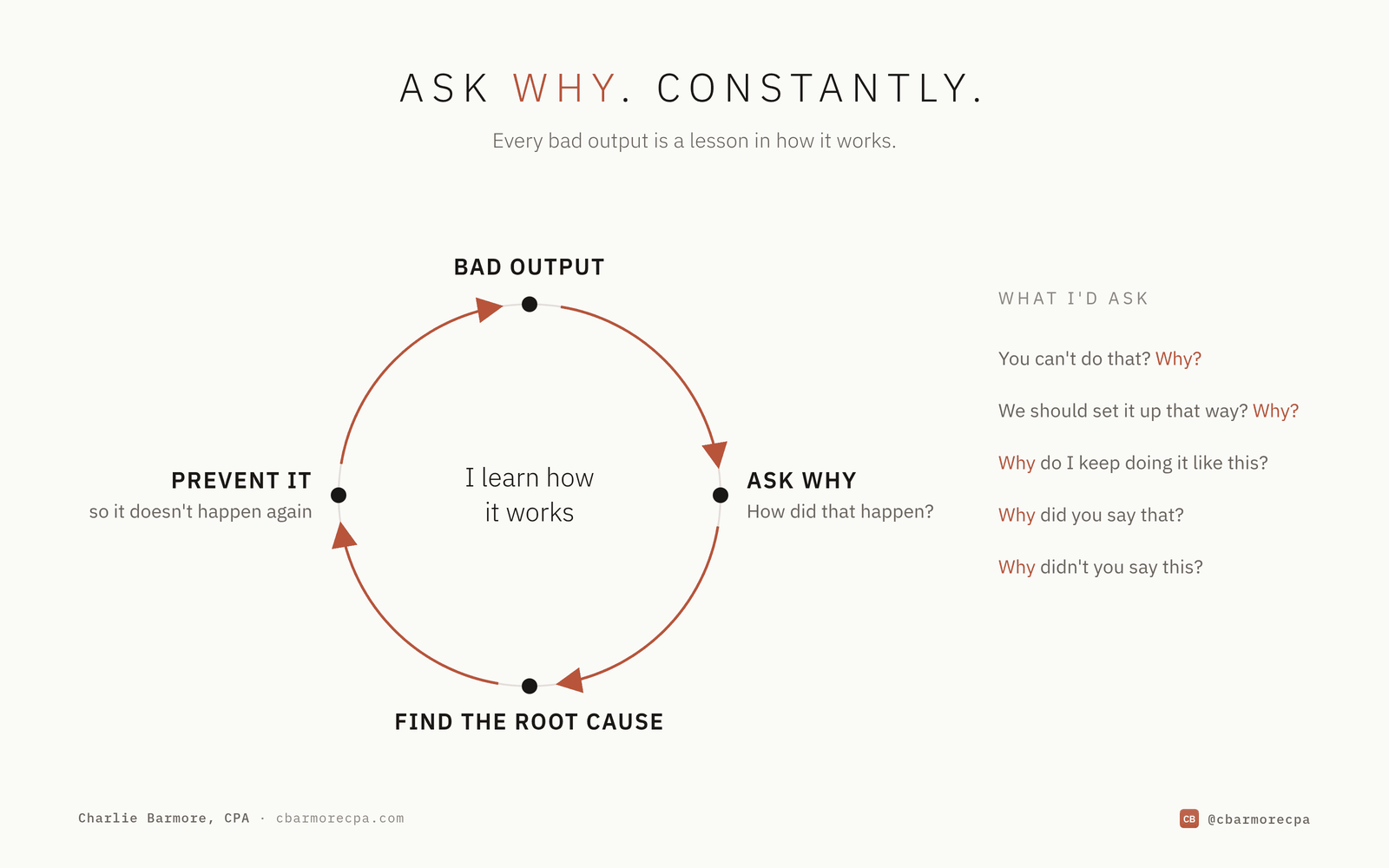
And I’d probably focus more on the bad. When it got something wrong or gave me bad output, I’d really try to get to the root cause: how it happened, why it happened, and how to prevent it from happening again.
I’d ask it “why” constantly:
You can’t do that? Why?
We should set it up that way? Why?
Why do we keep doing it like this?
Why did you say that?
Why didn’t you say this?
Why, why, why?
To me, that’s the point. The better I understand how it works, the better I can use it.
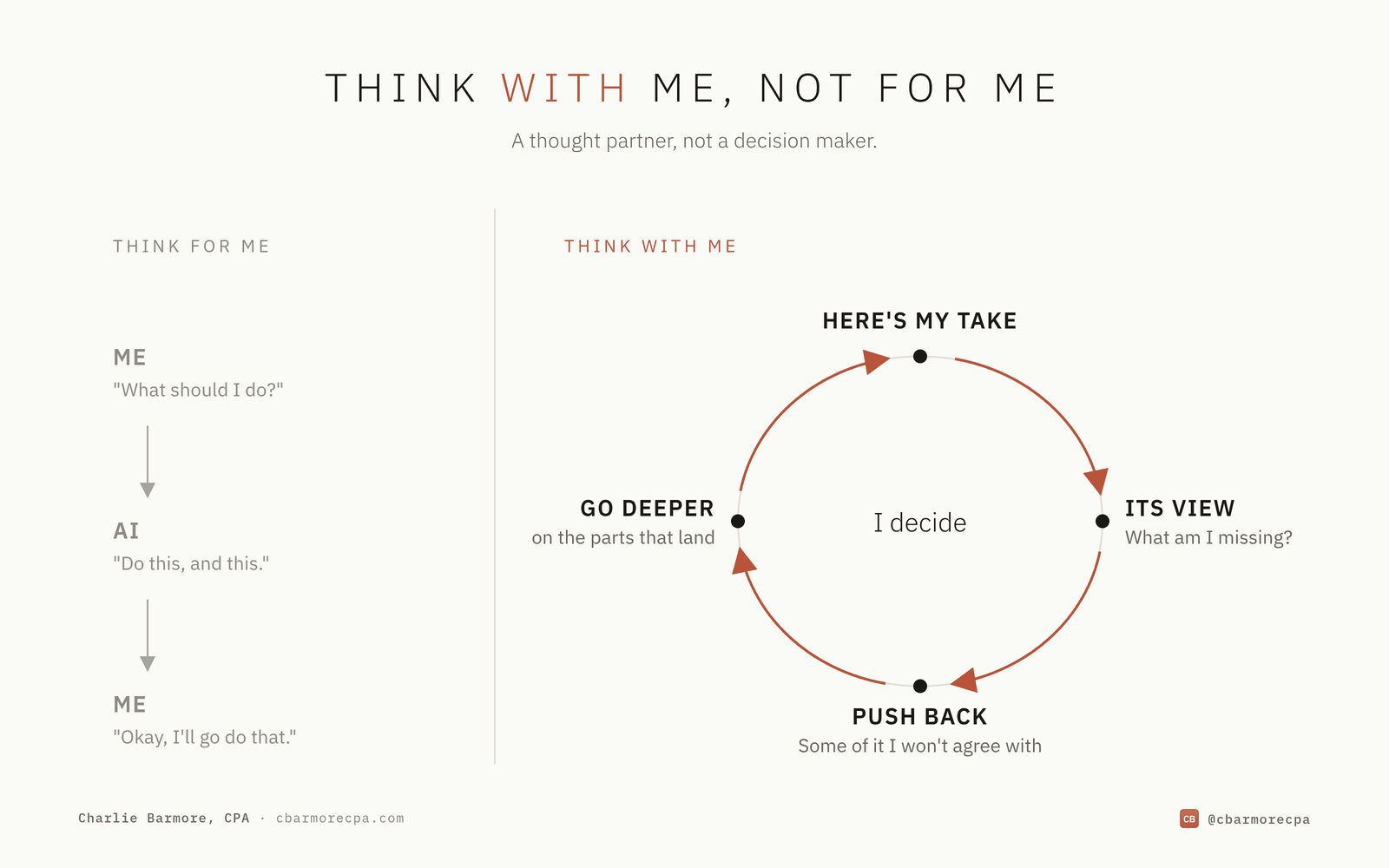
8. I’d use AI as a thought partner, not a decision maker
I want AI to think with me, not think for me.
I don’t let these things think for me. If I just said “what should I do for the next two months” and it answered “do this and this” and I said “okay, I’ll go do that,” that’s AI thinking for me. I’m not interested in that.
What I do instead is tell it how I’m actually thinking:
Here’s my take. Here’s my angle. Can we talk this through? Give me your perspective. Is there something I’m missing? Play devil’s advocate with me.
Then I take what it says and spar with it. “That point’s interesting, I didn’t really think about that, let’s go deeper on this.” And then I push back. Some of it’s valid, some of it I don’t agree with. But I’m not going to agree with it just because it said it.
And the pushback works both ways. There have been several times it’s told me something’s not a good idea:
“Why would you build this app? There’s a million of them already. Why don’t you just download one?”
Because I want to. I want to learn the process of building one, not just end up with one to use.
The second half of November: I’d build something for myself
Thanksgiving is the first place I’d try this on something small. Say I’ve been asked to bring a dish. I’d start with a recipe, but then I’d keep going. I’d have it brainstorm something a little more interesting, generate a picture of the finished dish so I can see what I’m aiming for, write out the cooking steps, work out the quantities for the number of people coming, and build a shopping list. If it can find my local grocery store’s layout, I’d have it sort the list by aisle. If it can’t, I’d sort it myself. Either way, a side dish turns into a small project, and AI helps at every step.
Yes, I could just download an existing recipe guide from somewhere online. But, I don’t want to, I want to start from scratch and build my own version and then maybe I end up creating my own virtual recipe book. Probably not (I’m not big into cooking), but who knows, maybe this experience turns me into one.
9. I’d build something (probably several things)
I like to build things, I always have, so I’d get to building with Claude. But not too many things where I never take one from beginning to end.
If there’s one thing that sped up my understanding of AI more than anything else, it was building software. And again, I’d start with something that has nothing to do with work. The first thing I built was a personalized workout tracker app.
I used to work out at a gym (I work out at home now), and one problem I had at a commercial gym was tracking my workouts. The gym had three different types of basically every machine. They were all slightly different models, and 90 pounds on one didn’t equal 90 pounds on another one, even though the machines looked basically the same.
And every tracking app treats a lat pulldown as a lat pulldown, which made it difficult to really track my progress if I couldn’t use the same machine every time that exercise called for it.
So I built an app and called it Gym Ledger. I inventoried every piece of equipment in that gym, took a picture of each machine, and uploaded them into the app. Then I could track my progress on the exact machine I was using.
This wasn’t a revolutionary app, or even a very complicated one to build, but I learned a ton. I had to figure out how to:
- Host it
- Log into it
- Set up a database to store the equipment images and my workouts over time
- Configure the front end
- Test, fix bugs, and iterate on it
I didn’t know how to do any of it, but I worked through every stage of it with AI:
- Describe what I wanted
- Test what it built
- Ask what we were doing and why (important)
- Fix what broke, and figure out why it broke (also important)
Then once I got it working, I remember thinking: this is actually pretty cool. What else could I build?
Since then I’ve built numerous other personal-use apps, and that success led to the comfort, capability, and confidence to start building apps for the work I do. I built a bookkeeping app, a workpaper binder app, a client portal, a note-taker app and much more.
Then I started on hardware builds:
- I built a little desk gadget on a Raspberry Pi that shows my AI usage.
- I gutted a 17-inch iMac G4 and installed a Juicy Crumb DockLite board, so it now works as the display and dock for my Mac mini.
- I took a cheap Amazon photo frame and turned it into a screen that shows my son’s school bus location and alerts me when it’s pulling down our street, so he never misses the bus again (only happened once…).
I’d approach these builds the same way as the ideas above. I’d create a builds folder inside the AI-Native folder, tell Claude this is where I want to work on building things, and have it create a separate folder for each build.
Not every build has to be serious. I’m building a game with my son right now, based on all his favorite shows and movies. It started as a Pokémon-style game, and then he kept adding things: a Jurassic Park island, Sonic’s zones, an Avengers city. He comes up with the ideas, prompts Claude to build them, and playtests everything (very strict QA department). Neither of us knew how to build a game. The game matters less than what it teaches: how to describe an idea clearly, try it, see what breaks, and fix it.
Building an app to sell to thousands of people is a whole different ballgame and not something to be taken lightly. But building one only I use, to solve one problem I have, is one of the best ways I know to learn.
10. I’d start thinking bespoke
There were already plenty of fitness apps out there (I’ve pretty much tried them all), but I wanted one built around that gym, that gym’s equipment, and the way I wanted to track my workouts. That’s a small example of something I think is a much bigger deal.
For decades we’ve adapted how we work to whatever software was available, and we’ve standardized how we deliver our services because customization was expensive.
AI changes this. First it’s small software built exactly the way I want it. Then it’s deliverables:
- One client wants traditional financial statements
- Another wants a cash dashboard
- Another wants to ask questions about their business in plain English
The work underneath is the same, but the deliverable, the format, the presentation, is now in the eye of the beholder. We can now get creative with our services. People say AI really caters to those who are lazy. I disagree. I think it caters to the creatives. So, get creative with the things you’re doing with AI.
Ask yourself: what could AI help me put on my plate that I never would have attempted before?
December: I’d put it to work on my own accounting and taxes
By December I’d move from building for myself to the work I do. I’m a CPA, so that’s accounting and taxes, and I’d start with my own. Whatever your work is, I’d start with something you know well enough to check.
First my own books and financials. I’d have AI set up my bookkeeping, categorize the transactions, and build the financial statements from the source records, then check them against what I know about my business.
Then my own tax return. I’d have AI redo my 2025 return from beginning to end, starting from the source documents. I wouldn’t hand it my completed return and ask it to agree with me. The 2025 return is already filed, so this is a practice run, not a re-filing.
Then I’d compare. I’d go through the two returns line by line and review every difference. Some of the differences will be mine, where I made a judgment call I’d want to revisit. Some will be the AI’s, where it got a rule wrong, missed a document, or made something up. The differences are where I’d learn the most: which version is right, why, and what the process should catch next time.
11. I’d delegate real work, and trust it slowly
Once I’d gained a decent level of comfort, capability, and confidence, I’d start using it on real work. I’d move from asking AI questions to handing it work, the same way I’d hand an assignment to a new employee, focusing on:
- What it needs to know
- What done looks like
- When to stop and ask me for clarification
I wouldn’t hand over the keys on day one. I’d start it on something small and review the work carefully. If it kept doing well, it would get more. And I’d write the rules into the CLAUDE.md: what it can do on its own, and what it always has to ask me about. I’d identify the things that can’t be undone and keep those with me (for now). When a task worked a couple of times, I’d have Claude save it as a skill/template/workflow so I can easily run it again the next time I need to.
12. I’d rethink one process from scratch
By the end of the year I’d pick one process I do all the time and actually redesign it. Not just speed it up, and not just patch it with Claude.
Most AI conversations focus on speed. How much faster can something be done with AI. That’s worth something, but I think it undersells what’s possible. I’d push on a different question: could this be ten times better, not just ten percent faster?
Take the monthly financial package for example. With AI, I could assemble it faster. But what if I reconsidered the deliverable itself? I could build each client a dashboard they can explore: trends, the questions they keep asking, the numbers behind them, all in one place. The client isn’t just receiving a report faster. They’re getting something they couldn’t have had before.
I’d think deeply (with Claude) about the process. If I were starting this business today, knowing what I know now, would I build this process the same way?
- Why does this step need a person?
- Why am I moving this data between systems by hand?
- Why am I using this software?
- Can I do this all with AI?
- What would the client be able to do if the deliverable itself changed?
- What happens if I try?
I wouldn’t need the redesign finished by December 31. Asking these questions about one process is how I’d start seeing the others differently.
Where I’d want to be on January 1
Going back to my definition: comfortable, capable, and confident using AI.
For me:
- Comfortable would mean AI is the first thing I reach for during the day, without having to remind myself.
- Capable would mean I’ve built a few things that work and that I’m proud of, and I’ve successfully redesigned a couple processes that I’m actually using on the regular.
- Confident would mean I no longer have any hesitation when presented with a problem, because I now have conviction that I can figure it out with AI.
What it wouldn’t mean is that I can’t do anything without AI. That’s not the goal. If AI disappeared tomorrow, I’d be a bit sad, but honestly probably a little relieved too. Regardless, I’d keep going. I’d still know my work, and I’d still know how to think through a problem. AI should make me better at those things, not replace my ability to do them.
I’d also want my AI-Native folder to be full: every lesson, idea, build, and rule from the last two months, in one place an agent can read. I wouldn’t care if it’s messy, or if there are half-baked ideas and builds in there.
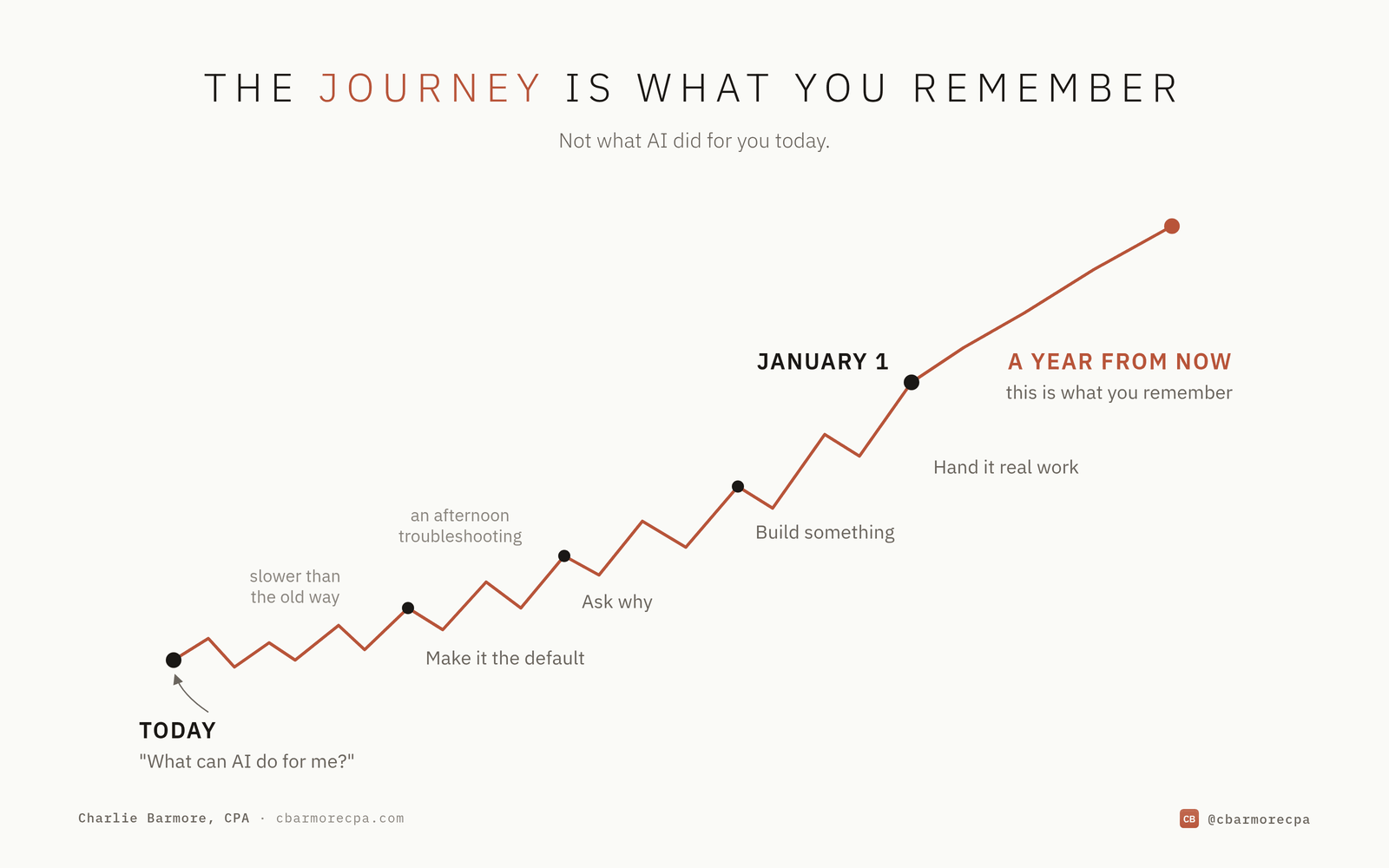
Some of this will take longer than doing it the old way. I’d spend an afternoon troubleshooting something I could have done by hand in ten minutes. I wouldn’t worry much about how much time AI saved me between now and December 31. I’d care a lot more about how much more I could do by January 1, because that’s my goal.
This isn’t meant to be seen as a step-by-step tutorial. That’s because I genuinely don’t believe that’s the way. I think becoming AI-native is more about a mindset shift. A lot of what I’ve discussed above, both directly and indirectly, causes you to think and approach things differently. That ends up snowballing and bleeding over into other aspects of your life.
Is two months enough time to become AI-native? Maybe, maybe not. I’m not saying that if you do all of the above, you’ll get there. It’s just how I’d approach it, and at a high level what I basically did.
The key is being intentional throughout the journey, because that’s likely what will stick with you the most.